
Most people’s only window into their electricity use is a single number on a monthly bill — by the time you see it, the usage that caused it is long gone. Real-time energy monitoring apps and devices close that gap, showing you consumption as it happens, sometimes down to the individual appliance. This guide covers the full range of options, from completely free utility apps to whole-home monitoring systems, so you can pick the right level of detail for your goals and budget.
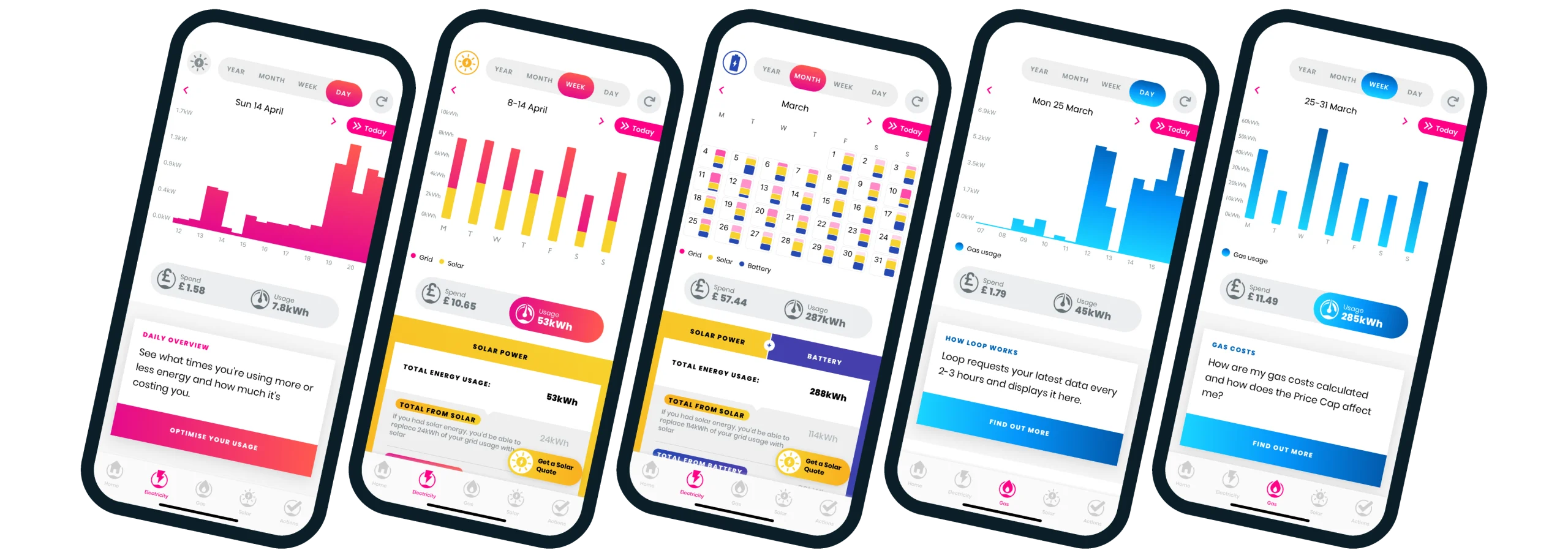
Does Real-Time Feedback Actually Change Behavior?
Yes, according to independent research. The American Council for an Energy-Efficient Economy (ACEEE) has found that real-time energy feedback reduces residential electricity consumption by 5-15% on average, with more engaged users who actively check and respond to their data seeing savings in the 15-25% range. This is a meaningful, independently-verified effect — simply making usage visible changes how people use electricity, even before any equipment changes.
Start Free: Check Your Utility’s Own App or Dashboard First
Before spending anything, check whether your utility already provides a usage dashboard or app — a large and growing number do, particularly for customers with a smart meter already installed. These typically show:
- Daily or hourly usage broken down by time period.
- Comparisons to previous months or the same period last year.
- Sometimes, a cost estimate based on your actual rate plan.
This won’t give you appliance-level detail, but it’s genuinely useful, completely free, and requires no additional hardware — a reasonable first step before considering a paid monitoring device.
Whole-Home Monitors: The Next Level of Detail
If your utility’s app isn’t detailed enough, or you want appliance-level insight, a dedicated home energy monitor is the next step. These fall into two broad categories: whole-home monitors that read your main electrical feed, and circuit-level monitors that track individual breakers separately.
Sense — Best for Appliance-Level Detection Without Extra Hardware
Priced around $299, Sense installs at your main electrical panel and uses machine learning to identify individual appliances by their unique electrical signatures — over time, it learns to recognize your refrigerator, dryer, HVAC system, and dozens of other devices without needing a separate sensor clipped to each one. It’s widely considered the “gold standard” for this specific detection approach, offering real-time power draw, phantom-load detection through its “always on” category, and a polished app with historical data. The trade-offs: device detection takes several weeks to fully learn your home’s devices, accuracy isn’t perfect (it can occasionally confuse devices with similar wattage signatures), and installation typically requires a professional or an experienced DIYer working inside the electrical panel.
Best for: Households wanting appliance-level insight without installing a separate sensor on every circuit.
Emporia Vue — Best Value for Circuit-Level Monitoring
At roughly $90-$200 depending on configuration (the base unit monitors your main feed; expansion kits with 8 or 16 circuit sensors cost more), the Emporia Vue is consistently cited as the best value in home energy monitoring. Rather than using machine learning to guess at appliances from the main feed like Sense, it uses physical clamp sensors on individual circuit breakers for direct, circuit-specific readings. It supports utility rate configuration (showing cost in dollars, not just kWh) and integrates with Emporia’s other products, including its EV charger, for coordinated time-of-use or solar-synced charging.
Best for: Budget-conscious households wanting genuine circuit-level accuracy without Sense’s higher price tag.
Curb — Best Polished App Experience
At around $400, Curb sits between Emporia’s budget pricing and Sense’s premium detection approach, offering 18 circuit-level sensors — more than any other consumer monitor in this comparison — paired with a particularly well-regarded app experience, including solar production-versus-consumption views and highly configurable alerts. Professional installation support is available for homeowners who’d rather not work inside their own panel.
Best for: Homeowners wanting the most circuit coverage and the most polished app experience, and who are willing to pay a premium for both.
Rainforest Eagle — Best for Utility-Accurate Data Without Opening Your Panel
A fundamentally different approach at around $100: rather than clamp-on current transformers, the Rainforest Eagle reads data directly from your utility’s smart meter, giving genuinely utility-accurate figures without requiring any work inside your electrical panel at all.
Best for: Homeowners who want accurate, panel-free monitoring and whose utility supports this connection method.
Span Smart Panel — A Different Category Entirely
The Span Smart Panel isn’t a monitoring add-on — it’s a full electrical panel replacement (around $3,500-$5,000 installed) that turns every individual breaker into a software-controlled, individually-metered circuit. This is overkill and hard to justify purely for monitoring purposes when a $100 Emporia Vue provides most of the same visibility, but it makes real sense for homeowners who are already planning a panel upgrade or new solar-plus-battery installation, since the incremental cost of choosing Span over a standard replacement panel is much easier to justify in that context.
Best for: Homeowners already replacing their panel anyway, particularly alongside a new solar or EV charging installation — not a standalone monitoring purchase.
Quick Comparison Table
| Option | Price | Approach | Best for |
|---|---|---|---|
| Utility app/dashboard | Free | Whole-home, utility-provided | A free first step for anyone |
| Sense | ~$299 | ML-based appliance detection from main feed | Appliance-level insight without extra sensors |
| Emporia Vue | ~$90-200 | Clamp sensors, circuit-level | Best overall value |
| Curb | ~$400 | 18 clamp sensors, premium app | Most circuit coverage, polished experience |
| Rainforest Eagle | ~$100 | Reads utility smart meter directly | Accurate data without opening your panel |
| Span Smart Panel | ~$3,500-5,000 | Full panel replacement | Only if replacing your panel anyway |
No Subscription Fees Required (Watch for Exceptions)
Sense, Emporia, and most utility apps are subscription-free for their core functionality — worth confirming for any product you’re considering, since ongoing subscription costs can meaningfully change the total cost of ownership on what looks like a one-time hardware purchase.
How to Choose the Right Option for You
- Start with your utility’s free app or dashboard if you haven’t already checked what’s available — it costs nothing and may be detailed enough on its own.
- If you want appliance-level insight without installing per-circuit sensors → Sense.
- If you want the best value with genuine circuit-level accuracy → Emporia Vue.
- If you want the most circuit coverage and the most polished app → Curb.
- If you want accurate data without any panel work → Rainforest Eagle (utility compatibility permitting).
- If you’re already replacing your electrical panel for solar, an EV charger, or a general upgrade → consider Span as part of that larger project, not as a standalone monitoring purchase.
Final Thoughts
Real-time energy monitoring isn’t just a novelty — independent research confirms it genuinely changes behavior and reduces consumption, with engaged users seeing meaningfully larger savings than passive ones. The right tool depends entirely on how much detail you want and what you’re willing to spend: your utility’s free app is a reasonable starting point for anyone, Emporia Vue offers the best overall value for genuine circuit-level data, Sense delivers appliance-level insight without per-circuit sensors, and Span only makes sense if you’re already replacing your panel for other reasons. Whichever option you choose, the value comes from actually checking it regularly — the ACEEE data is clear that passive ownership delivers far less benefit than active engagement with what the data is showing you.